 XC Techs Knowledge Base We Are Here to Help You In Style
Related Articles



One of the most common issues that people seem to encounter with the Apple TV is their remote going out of sync, leading the user to believe that their device is frozen or remote broken. It’s not quite clear what causes this issue, possibly sitting on the remote or pressing too many buttons at the same time, but it’s extremely easy to fix this one.
REMOTE CONTROL NOT RESPONDING? OR SCREEN FROZEN?
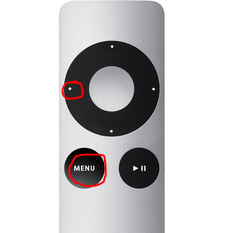
1: Press and hold both the “MENU” and “LEFT” buttons on the remote control at the same time for 45 seconds and then release. Make sure it’s pointing at your Apple TV while doing this.
2: That’s it, easy wasn’t it? You’ll probably see a little remote control looking icon show up in the top left corner once it’s working again.
Congratulations! Now you can stop thinking that your device is frozen and continue using it as intended.